
Extension Development
Learn how to create extensions to extend Volt's functionality
Extension Development Guide
Build powerful extensions for Volt
Create extensions that integrate seamlessly with Volt's lightning-fast architecture. Extensions are distributed as ZIP files and can be shared via the official registry.
Welcome to the Volt extension development guide! This guide will help you create your own extensions to extend Volt's capabilities.
Security model
Community extensions run inside a Web Worker sandbox with strict CSP. eval, XMLHttpRequest, WebSocket, and direct DOM access are blocked. Network calls go through a permission-gated proxy. See Sandbox & permissions before publishing.
SDK & CLI
Install the official SDK and CLI tool to get started:
npm install @voltlaunchrr/plugin-api
npm install -g @voltlaunchrr/plugin-cli
bun add @voltlaunchrr/plugin-api
bun add -g @voltlaunchrr/plugin-clipnpm add @voltlaunchrr/plugin-api
pnpm add -g @voltlaunchrr/plugin-cliThe CLI provides scaffolding, validation, and packaging:
volt-plugin init my-extension    # Scaffold a new extension
volt-plugin test                 # Validate manifest, interface, and types
volt-plugin publish              # Package and generate registry entry
Quick Start
Create Extension Directory
Use the CLI or create manually:
volt-plugin init my-extension
cd my-extensionCreate manifest.json
Every extension requires a manifest file:
{
  "id": "my-extension",
  "name": "My Extension",
  "version": "1.0.0",
  "description": "A custom Volt extension",
  "author": { "name": "Your Name" },
  "main": "index.ts",
  "category": "utilities",
  "minVoltVersion": "0.4.0",
  "permissions": []
}
Implement Your Plugin
Create the main plugin file:
class MyExtensionPlugin implements Plugin {
  id = 'my-extension';
  name = 'My Extension';
  description = 'A custom Volt extension';
  enabled = true;

  canHandle(context: PluginContext): boolean {
    return context.query.toLowerCase().startsWith('my ');
  }

  match(context: PluginContext): PluginResult[] {
    const { PluginResultType } = window.VoltAPI.types;
    const query = context.query.slice(3); // Remove "my "

    return [{
      id: '1',
      type: PluginResultType.Info,
      title: `Process: ${query}`,
      subtitle: 'Press Enter to execute',
      icon: '⚡',
      score: 100,
      data: { query }
    }];
  }

  async execute(result: PluginResult): Promise<void> {
    window.VoltAPI.notify(`Executed with: ${result.data?.query}`, 'success');
  }
}

export default MyExtensionPlugin;
Test Your Extension (Dev Mode)
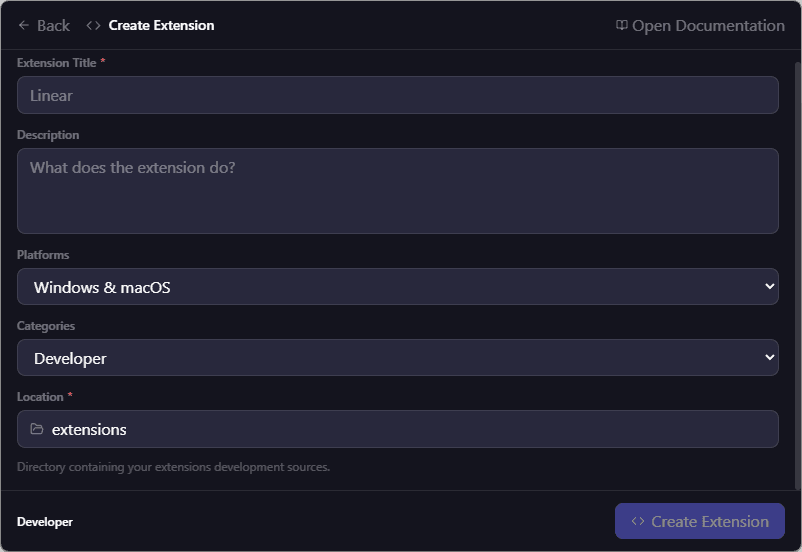
- Open Volt → Settings → Extensions
- Click "Link Dev Extension"
- Select your extension folder
- Type your trigger keyword to test!
Hot Reload
Edit your code, save, and press Ctrl+R to refresh. No packaging required!
See Development Workflow for more options.
Extension Architecture
Volt features a hybrid extension system with two layers:
Frontend Extensions
TypeScript - Handle UI and user interactions. Perfect for calculators, web searches, generators.
Backend Plugins
Rust - Handle system integrations. Perfect for game scanners, system monitors, file operations.
Frontend Extensions
- Written in TypeScript
- Run in browser context
- Access to
window.VoltAPIfor utilities - 500ms timeout per query
- Perfect for: calculators, web searches, generators, converters
class MyPlugin implements Plugin {
  id = 'my-plugin';
  name = 'My Plugin';
  description = 'Does something useful';
  enabled = true;

  canHandle(context: PluginContext): boolean {
    return context.query.startsWith('my ');
  }

  match(context: PluginContext): PluginResult[] {
    const { PluginResultType } = window.VoltAPI.types;
    return [{
      id: '1',
      type: PluginResultType.Info,
      title: 'Result',
      score: 100
    }];
  }

  async execute(result: PluginResult): Promise<void> {
    await window.VoltAPI.utils.copyToClipboard('copied!');
    window.VoltAPI.notify('Done!', 'success');
  }
}

export default MyPlugin;
Backend Plugins
- Written in Rust
- Full system access
- Native performance
- Perfect for: game scanners, system monitors, file operations
use async_trait::async_trait;
use crate::core::traits::Plugin;

pub struct MyBackendPlugin {
    enabled: bool,
}

#[async_trait]
impl Plugin for MyBackendPlugin {
    fn id(&self) -> &str { "my-backend-plugin" }
    fn name(&self) -> &str { "My Backend Plugin" }
    fn description(&self) -> &str { "System-level integration" }
    fn is_enabled(&self) -> bool { self.enabled }
    fn required_capabilities(&self) -> Vec<String> { vec![] }

    async fn initialize(&mut self) -> Result<(), Box<dyn std::error::Error>> {
        Ok(())
    }

    async fn shutdown(&mut self) -> Result<(), Box<dyn std::error::Error>> {
        Ok(())
    }
}
Architecture Diagram
┌─────────────────────────────────────────────────────────┐
│              Frontend (React/TypeScript)                │
│  ┌───────────────────────────────────────────────────┐  │
│  │              Extension Loader                      │  │
│  │  • Loads extensions from ZIP or dev folders       │  │
│  │  • Bundles TypeScript → JavaScript                │  │
│  │  • Injects VoltAPI                                │  │
│  └───────────────────────────────────────────────────┘  │
│              ↓                                          │
│  ┌───────────────────────────────────────────────────┐  │
│  │              Plugin Registry                       │  │
│  │  • Manages all plugins (built-in + extensions)    │  │
│  │  • Routes queries to plugins                      │  │
│  │  • Handles 500ms timeouts                         │  │
│  └───────────────────────────────────────────────────┘  │
│              ↓                                          │
│  ┌─────────┐  ┌─────────┐  ┌─────────┐  ┌─────────┐   │
│  │ Built-in│  │Extension│  │Extension│  │  DEV    │   │
│  │ Plugin  │  │    A    │  │    B    │  │Extension│   │
│  └─────────┘  └─────────┘  └─────────┘  └─────────┘   │
└─────────────────────────────────────────────────────────┘
                    ↕ Tauri IPC
┌─────────────────────────────────────────────────────────┐
│               Backend (Rust/Tauri)                      │
│  ┌───────────────────────────────────────────────────┐  │
│  │         Extension Management Commands              │  │
│  │  • install_extension() / uninstall_extension()    │  │
│  │  • link_dev_extension() / unlink_dev_extension()  │  │
│  │  • toggle_extension() / refresh_dev_extension()   │  │
│  │  • fetch_extension_registry()                     │  │
│  └───────────────────────────────────────────────────┘  │
└─────────────────────────────────────────────────────────┘
VoltAPI - Global API
All extensions have access to the global window.VoltAPI object:
// Types
window.VoltAPI.types.PluginResultType; // Enum for result types

// Utilities
window.VoltAPI.utils.copyToClipboard(text); // Copy to clipboard
window.VoltAPI.utils.openUrl(url); // Open URL in browser
window.VoltAPI.utils.fuzzyScore(query, str); // Fuzzy matching
window.VoltAPI.utils.formatNumber(num); // Format numbers

// Backend communication
window.VoltAPI.invoke(command, args); // Call Tauri commands

// Events
window.VoltAPI.events.emit(event, data); // Emit custom event
window.VoltAPI.events.on(event, handler); // Subscribe to events

// Notifications
window.VoltAPI.notify(message, type); // Show notification
Full API Reference
See the API Reference for complete VoltAPI documentation.
Plugin Result Types
Extensions can return different types of results:
Prop
Type
Extension Distribution
Extensions are distributed as ZIP files via GitHub Releases:
- Package your extension files into a ZIP
- Create a GitHub Release with the ZIP as an asset
- Submit to the official registry for discoverability
my-extension-v1.0.0.zip
├── manifest.json
├── index.ts
├── types.ts
└── utils/
    └── helpers.ts
See the Publishing Guide for detailed instructions.

Complete Example
Here's a complete, production-ready extension:
// Greeting Extension
// Responds to "hello" queries with personalized greetings

interface Plugin {
  id: string;
  name: string;
  description: string;
  enabled: boolean;
  canHandle(context: PluginContext): boolean;
  match(context: PluginContext): PluginResult[];
  execute(result: PluginResult): Promise<void>;
}

interface PluginContext {
  query: string;
  settings?: Record<string, unknown>;
}

interface PluginResult {
  id: string;
  type: any;
  title: string;
  subtitle?: string;
  icon?: string;
  score: number;
  data?: Record<string, unknown>;
}

const TRIGGERS = ["hello", "hi", "hey", "greet"];

class GreetingPlugin implements Plugin {
  id = "greeting";
  name = "Greeting";
  description = "Friendly greetings for everyone";
  enabled = true;

  canHandle(context: PluginContext): boolean {
    const query = context.query.toLowerCase().trim();
    return TRIGGERS.some((t) => query.startsWith(t));
  }

  match(context: PluginContext): PluginResult[] {
    const { PluginResultType } = window.VoltAPI.types;
    const query = context.query.trim();

    // Extract name if provided (e.g., "hello John")
    const parts = query.split(/\s+/);
    const name = parts.length > 1 ? parts.slice(1).join(" ") : "friend";

    const greetings = [`Hello, ${name}! 👋`, `Hey there, ${name}! ✨`, `Greetings, ${name}! 🌟`];

    return greetings.map((greeting, i) => ({
      id: `greeting-${i}`,
      type: PluginResultType.Info,
      title: greeting,
      subtitle: "Press Enter to copy",
      icon: "👋",
      score: 100 - i,
      data: { greeting },
    }));
  }

  async execute(result: PluginResult): Promise<void> {
    const greeting = result.data?.greeting as string;
    const success = await window.VoltAPI.utils.copyToClipboard(greeting);

    if (success) {
      window.VoltAPI.notify("Greeting copied!", "success");
    }
  }
}

export default GreetingPlugin;{
"id": "greeting",
"name": "Greeting",
"version": "1.0.0",
"description": "Friendly greetings for everyone",
"author": { "name": "Your Name" },
"main": "index.ts",
"category": "utilities",
"keywords": ["hello", "greeting", "friendly"],
"minVoltVersion": "0.4.0",
"permissions": ["clipboard"]
}