
Built-in Features
Explore all of Volt's built-in plugins and capabilities
Built-in Features
Batteries included
Volt ships with powerful built-in plugins that cover the most common workflows — no extensions needed.
Volt comes with 14 built-in plugins on the frontend and 3 backend plugins for system-level operations. All are enabled by default and can be toggled in Settings.
What's new (May 2026)
Recent additions: AI Chat (LLM integration), Notes, Developer Tools, refreshed Snippets with new variables, and a dedicated Window Management plugin.
Calculator
A full-featured calculator that handles math, unit conversions, date calculations, and timezone conversions.
Type any math expression directly:
2 + 2           → 4
sqrt(16)        → 4
10^3            → 1,000
(50 + 25) / 3   → 25
sin(45)         → 0.7071067812
100 * 1.15      → 115
Supported: +, -, *, /, ^ (power), % (modulo), sqrt(), sin(), cos(), tan(), log(), abs(), parentheses.
Press Enter to copy the result to your clipboard.
Convert between units naturally:
10km to miles       → 6.21 miles
50F to C            → 10°C
100lbs to kg        → 45.36 kg
5 gallons to liters → 18.93 liters
Supports length, weight, temperature, volume, and more.
Calculate dates and durations:
days until christmas    → 253 days
date + 30 days          → May 16, 2026
days between 01/01 and 12/31  → 364 days
Convert times across timezones:
time in Tokyo       → 2:30 AM JST
3pm EST to PST      → 12:00 PM PST
time in London      → 6:30 PM GMT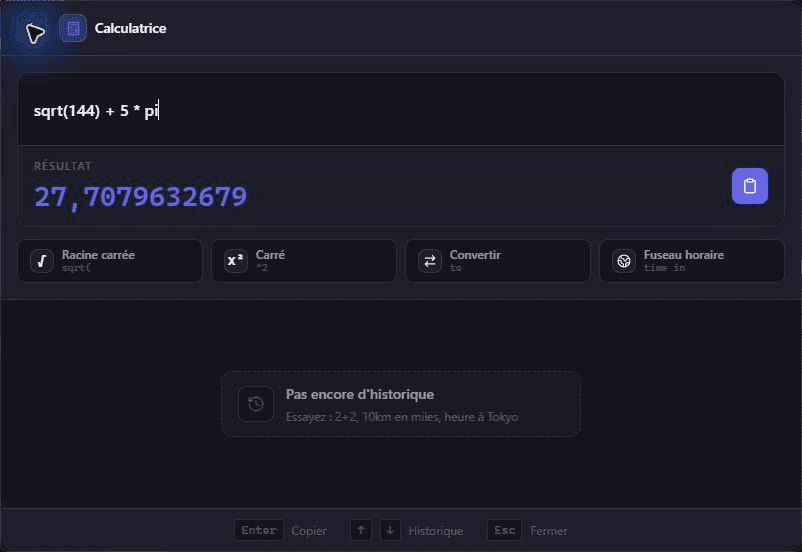

Emoji Picker
Search and insert emojis with the : prefix.
:wave       → 👋
:fire       → 🔥
:thumbsup   → 👍
:rocket → 🚀- Browse by category with a visual grid
- Recent emojis appear first for quick access
- Skin tone variations supported
- Press
Enterto copy the emoji to clipboard

Web Search
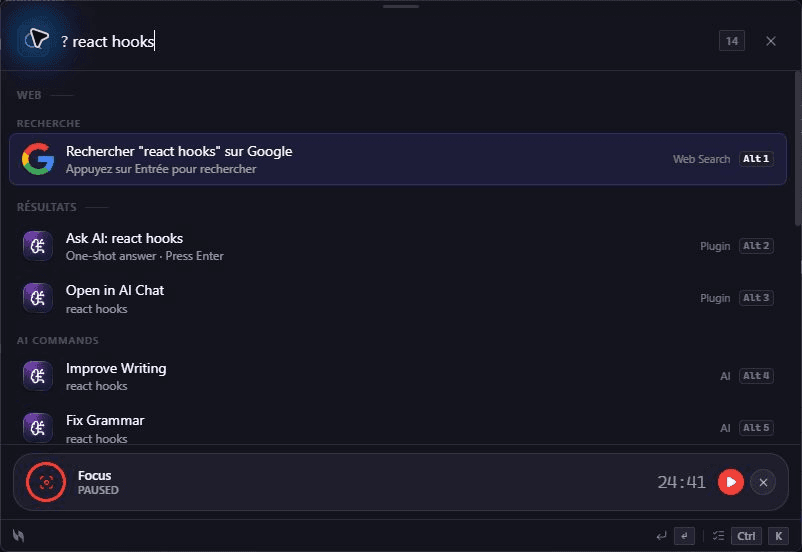
Search the web with the ? prefix. Supports multiple engines.
?best coffee maker     → Google, Bing, DuckDuckGo results
search weather paris   → Search all engines
google react docs      → Google search
Triggers: ?, search , web , google , bing , ddg
Press Enter to open the selected search engine in your default browser.
Timer
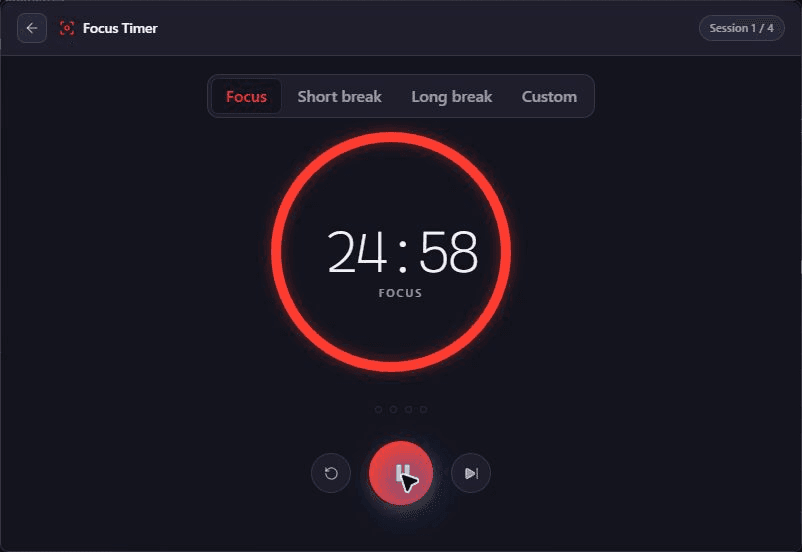
Full Pomodoro timer with natural syntax and auto-cycle support.
timer 25m       → Focus session
timer 5m        → Short break
timer 1h30m     → Custom duration
timer 90        → 90 minutes (plain number)
timer 1:30      → 1 hour 30 minutes
Modes:
| Mode | Default duration |
|---|---|
| Focus | 25 minutes |
| Short break | 5 minutes |
| Long break | 15 minutes |
| Custom | Any duration |
- Flexible parsing —
5m,1h30m,90,1:30all work - Auto-cycle — focus → short break → focus, automatically
- Desktop + audio notifications when each session ends
- Persists across hide/show — timers keep running in the background
- Multiple concurrent timers supported
Shell Commands
Run shell commands inline with the > prefix.
> ls                → List files
> git status        → Git status
> npm run build → Run a build- Streaming output — see results line-by-line in real time
- ANSI colors — 16 colors + bright, bold, dim, italic, underline
- Kill with
Ctrl+C, re-run last command with!!, search history with!prefix - Frecency history — 500 entries, smarter results over time
- 50 KB max output cap to keep results readable
- Configure timeout, working directory, and history size in Settings
Clipboard History
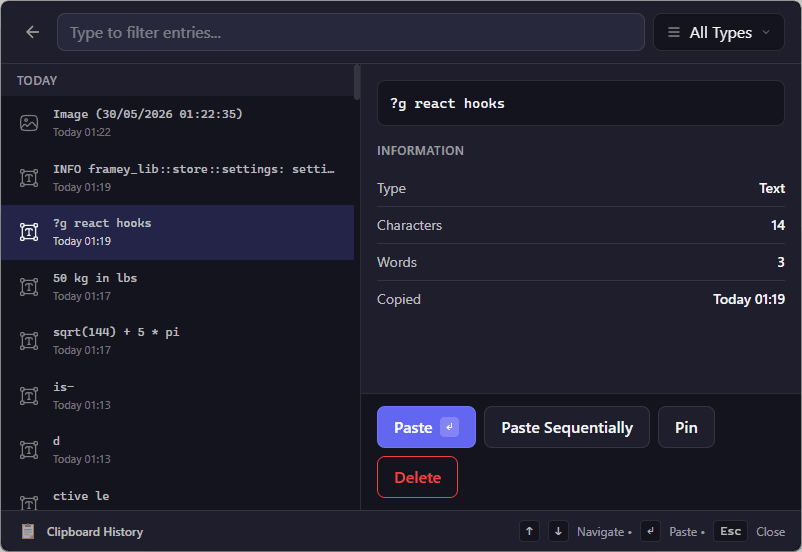
Access and search your clipboard history.
clipboard       → Show clipboard history
clip search → Search clipboard entries- Full-text search across all clipboard entries
- Pin important items to keep them at the top
- Delete individual entries
- Persistent storage — history survives restarts
- Clipboard monitoring can be toggled in Settings
Snippets
Text expansion with dynamic variables. Create reusable text templates.
snippets        → Browse all snippets
snippet new     → Create a new snippet
Variables
Snippets support dynamic variables that expand on execution:
| Variable | Expands to |
|---|---|
{date} | Current date |
{time} | Current time |
{clipboard} | Current clipboard content |
Example snippet: Meeting notes - {date} {time} expands to Meeting notes - 2026-04-16 14:30.
Manage snippets via Settings or the snippets command.
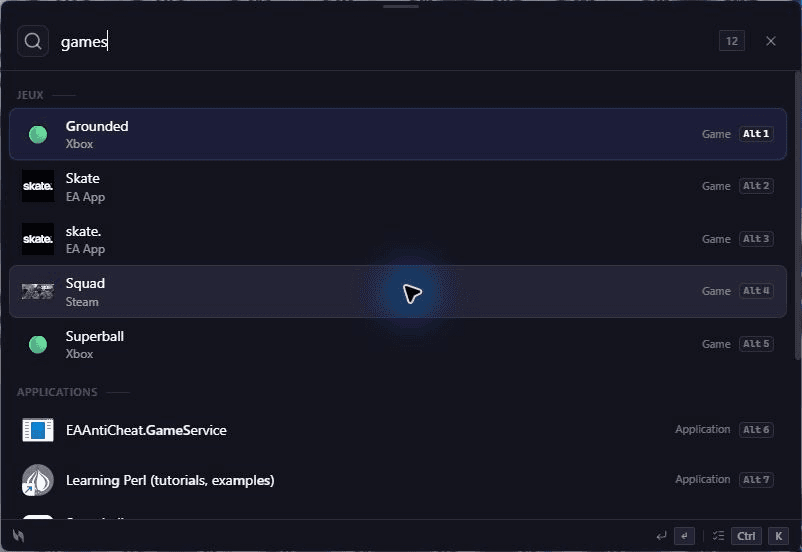
Game Scanner
Automatically detects installed games from multiple platforms.
Supported platforms (10):
| Platform | Detection method |
|---|---|
| Steam | Library manifest files (.acf) |
| Epic Games | Manifest files in ProgramData |
| GOG Galaxy | Registry entries |
| EA (Origin) | Registry + install paths |
| Ubisoft | Registry entries |
| Riot Games | Install path detection |
| Amazon Games | metadata.json in install directory |
| Battle.net | Registry (80+ product codes) |
| Rockstar Games | HKLM registry entries |
| Xbox Game Pass | Xbox app package scan |
- Games appear in search results alongside apps
- Shows a Game badge for easy identification
- Launch directly from Volt
System Commands
Quick system actions accessible by typing their name:
| Command | Action |
|---|---|
settings | Open Volt settings |
quit | Close Volt |
reload | Reload Volt configuration |
version | Show current version |
help | Show help / shortcut guide |
System Monitor
Monitor system resources in real-time with per-component granularity.
system → Show full system dashboard- Per-core CPU — individual usage per core + frequencies
- Per-disk — mount points, file systems, SSD/HDD classification
- Network — RX/TX throughput per interface, history, aggregated totals
- Top processes — top 5 by CPU + top 5 by RAM with process names
- Temperatures — CPU package, GPU, and sensors with critical thresholds
- System uptime
- Powered by the native
sysinfoRust crate for accurate metrics
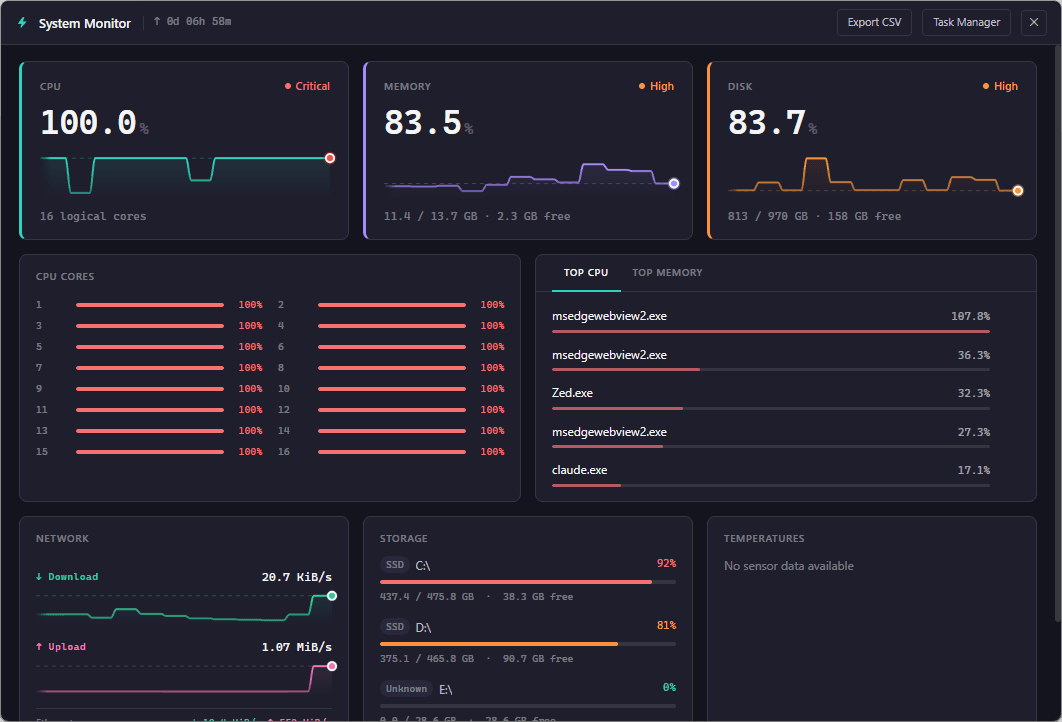
Polling is intelligent: 1 Hz when the monitor is open, 60-second interval in the background.
Quicklinks
Create custom shortcuts to frequently used apps, files, URLs, or folders.
ql:add     → Add a new quicklink
ql:list    → List all quicklinks
ql:remove → Remove a quicklink- Add via Settings → Quicklinks or using the
ql:addcommand inline - URLs, folders, and shell commands are all validated on creation
- Appear alongside app results with high priority
- Custom icons and descriptions
Window Management
Snap, resize, and arrange windows directly from Volt.
window left      → Snap active window to left half
window right     → Snap active window to right half
window center    → Center on current monitor
window maximize  → Maximize active window
window restore   → Restore default size
Available actions: left/right half, top/bottom half, quarter splits, center, maximize, restore, and move-to-monitor.
Works on Windows, macOS, and Linux through the native window manager.
AI Chat
Talk to an LLM provider directly from Volt — no context switch needed.
ai how do I parse JSON in Rust?
chat write a regex for emails
?ai explain quantum tunneling- Configure your provider (OpenAI / Anthropic / local) in Settings → Integrations
- Conversation history kept per-session
- API keys stored locally; never transmitted to Volt servers
- Streaming responses appear inline

AI Chat requires an API key for the configured provider. Volt never proxies your prompts.
Notes
A lightweight note-taking plugin with full-text search.
notes              → Browse all notes
note new meeting   → Create a new note titled "meeting"
note search regex → Search notes- Markdown supported, plain-text by default
- Notes persist to a single JSON store
- Indexed for instant search through hundreds of notes
{date},{time},{clipboard}variables on new-note creation

Developer Tools
Quick utilities for developers — UUID generation, hashing, encoding, JSON formatting, color picking, and more.
uuid                  → Generate a random UUID v4
hash md5 hello        → Compute MD5/SHA-1/SHA-256
base64 hello world    → Encode/decode base64
url encode a b c      → URL encode/decode
json {"a":1}          → Pretty-print JSON
color #ff5722         → Show color, RGB, HSL
lorem 50              → Generate Lorem Ipsum
Press Enter to copy the output to your clipboard.
Backend Plugins (Rust)
These plugins run natively for maximum performance:
Clipboard Manager
Tracks system clipboard changes in real-time with native OS integration
Game Scanner
Multi-platform game detection using native file system and registry access
System Monitor
CPU, RAM, and disk metrics via the sysinfo Rust crate
Backend plugins handle operations that require native OS access — clipboard monitoring, registry reading, file system scanning — and expose results to the frontend via Tauri IPC commands.
Frecency Ranking
Volt learns from your usage patterns using a frecency algorithm (frequency + recency):
- Apps you launch often rank higher
- Recently used items get a temporary boost
- The boost decays over time, so stale results fade
- Pin items to lock them at the top regardless of frecency
This means Volt gets faster and more personalized the more you use it.