
Introduction
Learn how to use Volt to open apps, find files, and get things done with one shortcut
Welcome to Volt
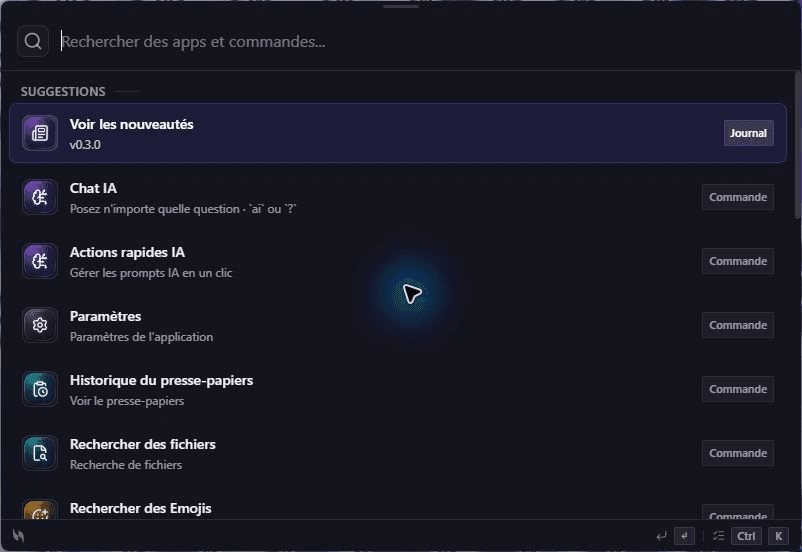
One shortcut for everyday tasks
The current release is Volt v0.5.0. Use it to open apps, find files, and pick up copied text without leaving what you are doing.
Volt brings the things you use on your computer into one place. Press your shortcut, type what you need, and carry on. It works on Windows, macOS, and Linux.
What is Volt?
Volt is a powerful application launcher that allows you to:
🚀 Launch apps instantly
Open any application with just a few keystrokes
🔍 Search everything
Files, apps, commands - find anything instantly
⚡ Execute actions
Perform tasks without touching your mouse
🎨 Make Volt yours
Add extensions when you want more from Volt
Key Features
⚡ Lightning Fast Performance
Volt helps you move from a thought to an action quickly. It uses Rust and Tauri under the hood.
- Instant fuzzy search with frecency ranking
- SQLite-backed file indexing
- Native Rust backend with Tauri 2
🧩 Extensible Architecture
Extend Volt's capabilities with a rich plugin ecosystem. Create custom commands, integrate with your favorite tools.
- Frontend extensions (TypeScript)
- Backend plugins (Rust)
- Official Extension Store with verified extensions
- Full VoltAPI access (clipboard, events, notifications)
🎨 Beautiful Design
A clean, modern interface that stays out of your way. Dark mode, themes, and customization options.
- Glassmorphism transparent window
- Dark / Light / Auto themes
- Smooth animations
- Multi-monitor support with window positioning
🔒 Privacy First
No telemetry, no tracking. Your data stays on your machine. Built with transparency in mind.
- Zero telemetry
- Local-first architecture
- No data collection
- Full data control
- Hardened auth: CSRF-protected OAuth deep links, JWT claim validation
- Sandboxed extensions: Worker eval/WebSocket/XMLHttpRequest disabled, network SSRF-protected
Quick Start
Get started with Volt in just a few steps:
Download Volt
Download Volt for your platform (Windows, macOS, or Linux)
Install and Launch
Run the installer and follow the setup wizard
Activate Volt
Press Ctrl+Space (Windows/Linux) or Cmd+Space (macOS)
Start Typing!
Type your query and let Volt do the magic ✨
Platform Support
- Windows 10 version 1903+ - Windows 11 (all versions) - 64-bit processor - Download for Windows →
- macOS 12 Monterey+ - Apple Silicon - Download for macOS →
- Ubuntu 20.04+ - Fedora 36+ - AppImage, .deb & .rpm available - Download for Linux →
Getting Help
📖 Installation Guide
Step-by-step installation instructions
📚 User Guide
Learn to use Volt effectively
⚡ Built-in Features
14 built-in plugins: calculator, clipboard, games, snippets, AI Chat, notes, window mgmt, and more
♿ Accessibility
WCAG AA, keyboard-only workflows, screen reader support
🧩 Extension Development
Build sandboxed extensions with TypeScript & the VoltAPI
🐛 GitHub Issues
Report bugs or request features
Ready to boost your productivity?
Download Volt now and experience the future of keyboard-driven productivity!